

The short answer
LosslessCut is designed for quick cuts: keep a section, remove one, or export selected segments without opening a full editing suite. In our test, a keyframe-based selection starting at 4.5 seconds produced an output whose first video frame was from 4.0 seconds—half a second earlier than the selected start.
That was one result from one synthetic 30fps file with keyframes every two seconds; it does not predict the shift on another recording. LosslessCut’s documentation says a keyframe cut can start at the previous keyframe, and the distance depends on the source encoding. Treat a selected time as a requested boundary. Inspect the exported file when the start matters. (LosslessCut troubleshooting)
We tested LosslessCut 3.70.2 in its GUI with one synthetic H.264/AAC fixture, using its keyframe-cut mode and a separately checksum-verified FFmpeg 9.0.2 engine. The bundled FFmpeg did not start in this environment; using the custom engine setting allowed the exports. This was a narrow file test, not a general reliability or ease-of-use assessment.
Where the workflow fits
Its appeal is a focused workflow. LosslessCut’s documentation lists keeping or removing segments, exporting them separately, and joining compatible media. It also documents remuxing into another container without re-encoding. Those are product-described capabilities, not all results from our test. We tested keeps, middle-segment removal and audio-track selection; we did not test joining files or remuxing into another container. (Features)
That scope can save time compared with opening a full editing suite for a straightforward trim. It also means the source file matters. The encoded video, its keyframe spacing, the container and its audio or data tracks all affect what a quick cut can produce. A familiar timeline does not make those underlying constraints disappear.
If the goal is a polished walkthrough, it can help to plan the recording before editing. Our software walkthrough guide covers the capture side; LosslessCut is more relevant once there is a recording to trim.
What happened in our test
Video stores complete pictures at keyframes, with intervening frames recording changes. The vendor says keyframe mode starts at the previous keyframe; in our 30fps fixture, keyframes were two seconds apart. (Features)
| GUI selection | Exported output and observation |
|---|---|
| Keep 4.5–10.5s | What the exported video contained What we learned |
| Keep 4–10s | What the exported video contained What we learned |
| Keep 6–12s; disable alternate audio | What the exported video contained What we learned |
| Remove 6–12s | What the exported video contained What we learned |
Requested start versus exported start
- Requested selection
- 4.500–10.500 seconds
- First retained source frame
- Frame 120 at 4.000 seconds: 0.500 seconds before the selected start
- Exported video
- 195 frames; source-frame timestamps 4.000–10.467 seconds
- MP4 container duration
- 6.528 seconds; container duration is a different measurement from source-frame timestamps
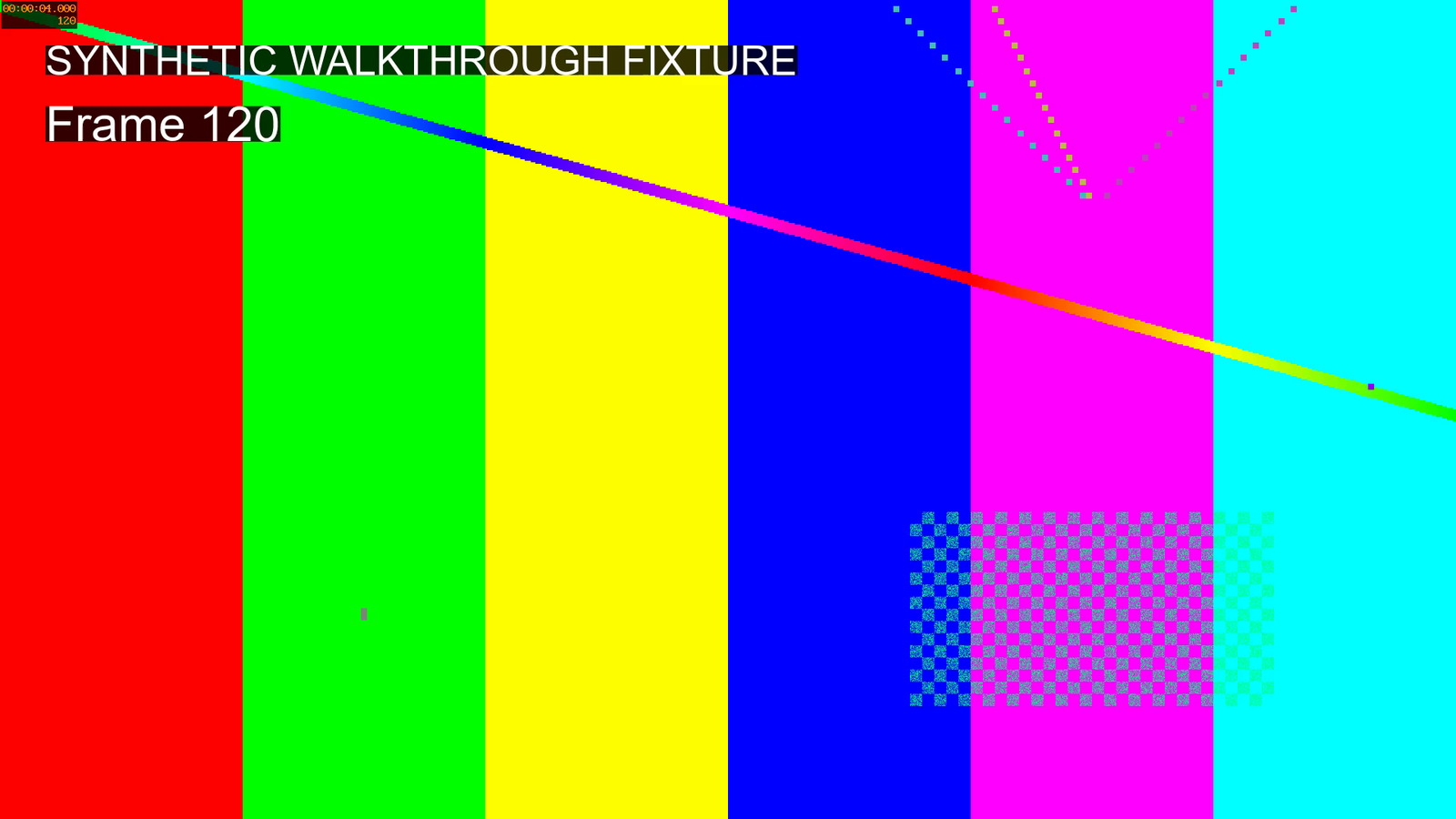
Observed on 4 November 2026 with LosslessCut 3.70.2, keyframe-cut mode, one synthetic 30fps H.264/AAC file with keyframes two seconds apart and the verified external FFmpeg engine. This finding does not predict another file’s boundary shift. Joining and Smart Cut were not tested; full decoding is not human playback or listening.
The removal export displayed “Cutpoints may be inaccurate.” We compared SHA-256 hashes for compressed packets in each output with the fixture: all retained video and audio packet content matched the source. That establishes packet copying without re-encoding for these five outputs only. It does not establish what another file or export setting will do. All five files passed full FFmpeg decoding, but we did not watch each one from beginning to end or listen to the synthetic audio. The app also showed a preview/playback warning while the synthetic image was visible.
What we did not test
LosslessCut’s documentation lists joining compatible files and offers Smart Cut as an experimental way to cut between keyframes. We tested neither. The vendor says Smart Cut re-encodes the part from the selected cut to the next keyframe and may not work with many files. Do not treat it as a guaranteed precise-cut mode. (Features, Troubleshooting)
The practical check is to export a short sample and inspect the actual start and end. The vendor also recommends checking the exported file because the selected times alone do not establish the final cut points. (Troubleshooting)
Audio tracks deserve a check too
A video may carry several audio, subtitle or data tracks. LosslessCut exposes track controls; its documentation warns that some unprocessable tracks can remain and affect output duration or cause other unexpected results. It recommends disabling unnecessary tracks and testing again if an export looks wrong. (Troubleshooting)
In our test, disabling the alternate audio track left one mono AAC stream; the other exports retained two. We checked the stream metadata and decoded the files, but did not listen to them. Before using an export, check that the intended track is present and the duration makes sense. If there is missing audio or an unexpected duration, inspect the file and isolate tracks before drawing a conclusion.
For readers choosing between edit tools, this is part of a broader question: what does the final file preserve? Our guide to what app exports preserve explains why an editable project, a remux and a re-encoded output are different things.
Who should consider it?
LosslessCut is worth considering when you want to keep or remove ranges quickly and can check the output. A keyframe cut is a poor “set exact times and forget it” choice when an arbitrary frame boundary is essential. The tested workflow also depended on an external FFmpeg folder because the app’s bundled engine failed its startup check on this Windows environment.
Before choosing it, ask:
- Can the cut begin at a nearby keyframe?
- Is a small amount of re-encoding acceptable if an exact boundary is needed?
- Have I checked the audio track and the actual output duration?
- Can I review the exported file before using or sharing it?
If those checks fit the job, LosslessCut’s focused workflow may be useful. If exact boundaries matter more than avoiding re-encoding, choose an editor and workflow that can make that trade-off explicit, then verify its output too.
Our verdict
Our central finding is specific but useful: a 4.5-second selection in LosslessCut 3.70.2 began at 4.0 seconds in this synthetic file. Packet hashes show that the tested outputs copied their retained streams, while the cut boundary still moved to an earlier keyframe. Inspect your export when the boundary matters.
We tested one synthetic fixture in one Windows setup. We did not test joining, Smart Cut, human playback or perceived audio/video quality. The result is not a universal accuracy or reliability claim. The bundled FFmpeg failed to start here; the bounded exports used the separately verified FFmpeg 9.0.2 custom folder. The exact Windows control behind that startup error was not identified.
Sources
- LosslessCut 3.70.2 release, checked 4 November 2026.
- LosslessCut features, checked 4 November 2026.
- LosslessCut troubleshooting, known issues and limitations, checked 4 November 2026.
Sources and evidence
- LosslessCut 3.70.2 release 2026-11-04
Release/version identification for the tested application.
- LosslessCut features documentation 2026-11-04
Vendor-documented keyframe cuts, segment export, joining, remuxing and Smart Cut; joining and Smart Cut are not presented as tested.
- LosslessCut troubleshooting and limitations 2026-11-04
Vendor-described keyframe boundary behavior, track guidance and Smart Cut limitations.
Editorial record
Testing status: Partially tested
Methodology: Bounded GUI test of LosslessCut 3.70.2 on one synthetic 20-second H.264/AAC fixture using keyframe-based cuts and FFmpeg 9.0.2. Independently checked stream metadata, durations, decoded output and retained-packet hashes. This does not test other media, joining, Smart Cut or subjective playback quality.
Tested 2026-11-04. Limits: Joining and remuxing were not tested. Smart Cut was not tested. No full human playback or listening test was performed. No subjective audio/video quality claim; one synthetic fixture and one environment only. The exact Windows control behind the bundled-engine startup failure is unknown.
Updates and corrections
- — Clarified the requested and exported cut boundaries using the retained original synthetic frame and results. No new testing was performed.
SunloopMedia Editorial
Published by SunloopMedia Editorial. Sources, testing state and material corrections are recorded above.
Suggest a correctionSelect the link and copy it using your keyboard or device menu.