
Imagine you’re using an AI writing tool to shorten a paragraph from a document on your laptop. The tool describes its AI as “local.” Does that also tell you whether an optional web-search feature sends a request elsewhere, or whether the app syncs the document? The label alone cannot answer those questions.
This is a hypothetical example, not behavior we observed in a product. To understand the feature, follow the task: what goes in, where it is processed, and which other services are involved.
What “local” actually describes
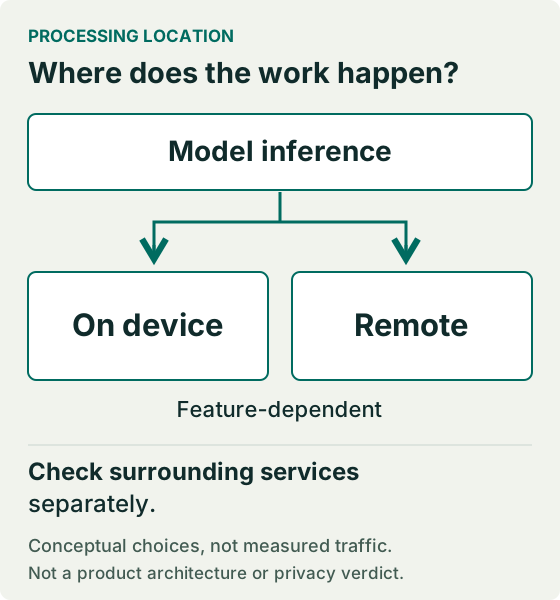
Inference is when a trained model uses an input to produce an output. Local inference happens on the device; cloud-based inference happens on a remote system. That tells you where the model step runs, not everything the application does.
For the hypothetical writing task above, the input might be a selected paragraph, your instructions or other context supplied by the app. Check what the request includes and whether anything else stores or sends a copy. Do not assume every file is sent, or that a local model prevents all other transfers.
Follow the whole data path
Use this diagram to organize your questions. The model step and optional services are shown separately. It is a conceptual map, not observed network traffic, a vendor diagram or a claim that every app uses all these paths.
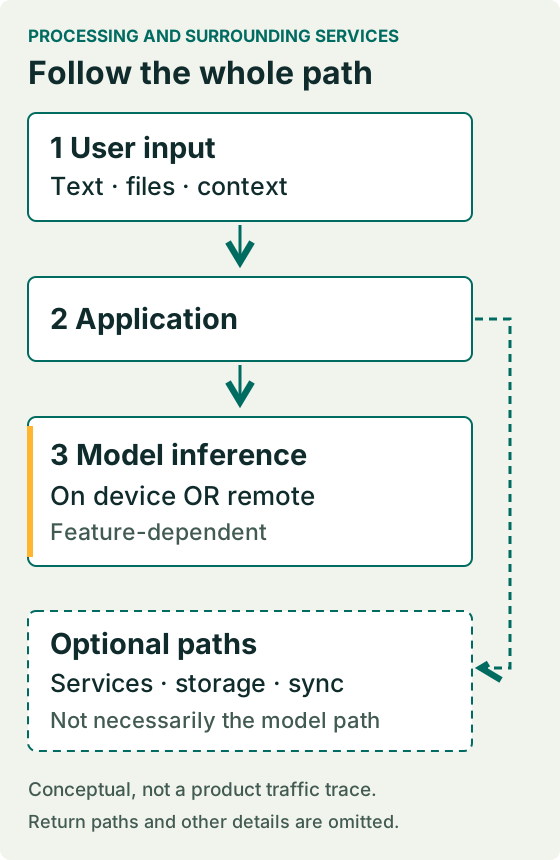
Look for the input, the app handling it, the model’s location, and any separate service or storage. Use the feature’s documentation to fill in the details. Leave anything unsupported marked “unknown.”
The path can change with the feature
Microsoft’s developer guidance describes designs that can use a local capability and a cloud fallback. This documents a possible hybrid approach, not the behavior of every Windows app. Check the particular feature and any conditions for switching paths.
An optional online action is another reason to check. In a hypothetical app, summarizing text locally and choosing “search for more information” could involve different paths. Ask whether that action changes what is sent, to whom and why.
Setup is not the same as everyday use
A feature may need downloads before it is ready. Microsoft’s Foundry Local prerequisites list initial package, model and runtime downloads. They also describe a compatible CPU model path: local AI does not universally require a dedicated NPU. This does not establish that a chosen model will work on your machine.
Google’s Gemini Nano documentation describes inference through Android’s AICore. Google’s ML Kit Prompt API setup instructions separately check whether the model is available or needs downloading. These describe named services and setup paths, not a guarantee that every Android app, phone or feature behaves the same way.
Check account sign-in, optional information retrieval, storage, sync, diagnostics and updates separately. Are they present, and what do the current documents say they send or keep? Do not infer those answers from the model’s location. We have not audited these behaviors in an app.
Check what a cloud request includes
A cloud inference request uses a remote system. The label alone does not say which information is included or how it is handled. Apple, for example, describes Private Cloud Compute as processing data relevant to a request. This is Apple’s documented description, not our independent verification of its privacy assurances or a rule for other services.
Check the feature’s input and context, storage or retention information, optional sharing and account settings. If a detail matters to your task but is unclear, keep it unresolved. Neither label provides a privacy guarantee.
When local AI or cloud AI may fit better
Local may fit when a suitable model runs adequately on your device and keeping the required inference there matters. Check memory, storage and runtime compatibility, not just whether the device has an NPU. You or the application may need to handle installation, model downloads and updates; how much is automatic depends on the product.
Cloud may fit when your device lacks suitable resources or the capability you need is offered through a remote service. The provider handles more of the model infrastructure, but you depend on its availability, service changes, account requirements and network access. Its data-handling terms must suit your task.
Speed and capability need a closer look. On-device inference can avoid a network round trip, but its speed depends on the hardware, model, runtime and workload. Cloud processing adds network dependency while using different remote resources. Neither is universally faster. Output quality also depends on the actual model/version, available context and features, and implementation, not location alone.
Compare the real costs. Local use may involve hardware, storage, electricity, setup time or paid software. Cloud products may charge subscriptions, API usage or service tiers, with provider-specific limits. Check the actual product’s pricing and requirements rather than assuming local means free or cloud always costs more.
A hypothetical choice: you want to summarize sensitive notes. If a suitable local feature runs acceptably and keeps the needed inference on-device, it may avoid sending that input for remote inference; check sync and other paths separately. If your device cannot run a suitable model, a cloud option may be more practical, provided its transmission and retention terms meet your requirements. Otherwise, neither option fits. This is a decision example, not a test result.
Five questions to reuse
SunloopMedia decision check
Use these five questions for one feature at a time.
- What is the task?
Name the exact feature and what you want it to do. - What is the input?
Check selected text, files and any documented extra context. - Where is it processed?
Find the device, remote or hybrid path for that request, including its limits. - What else connects or stores it?
Check optional services, account behavior, storage, sync and updates separately. - What is still unknown?
Record unverified device/version requirements, offline limits and data-handling details. Do not guess.
For a hypothetical task such as summarizing a non-sensitive document on a trip, check whether that exact feature is documented to work without connectivity after setup. Accessing the document, signing in or retrieving extra information may be separate questions. Do not turn a statement about one step into an offline promise for the whole task.
Try it with one feature
Choose one AI feature you already use. Make a short note with five fields: task → input → processing location → surrounding services → unknowns.
Fill in what the feature’s current documentation supports. Mark the gaps “unknown,” then identify which gap matters to your task. That gives you one clear next action: verify that missing detail before relying on the feature for that task.
Sources and evidence
- Microsoft: Choose between cloud-based and local AI models 2026-10-15
Developer guidance documents local/cloud choices and possible hybrid fallback; not proof of an individual app’s behavior.
- Microsoft: Get started with Foundry Local 2026-10-15
Prerequisites describe initial downloads and compatible CPU/GPU/NPU variants; actual model/device behavior was not tested.
- Google ML Kit: Get started with Prompt API 2026-10-27
Documents Gemini Nano availability/download states and AICore setup for the named ML Kit Prompt API (Beta); not a claim about every Android app or an independently tested device.
- Apple: Apple Intelligence and privacy on iPad 2026-10-15
Vendor description of request-relevant data in Private Cloud Compute; not independently audited or generalized to other services.
Editorial record
Testing status: Research / documentation based
Documentation-based explainer; no hands-on product tests, traffic audit, benchmark or product endorsement. AI-assisted writing with recorded source verification; owner editorially accepted; draft only, not publication approved.
SunloopMedia Editorial
Published by SunloopMedia Editorial. Sources, testing state and material corrections are recorded above.
Suggest a correctionSelect the link and copy it using your keyboard or device menu.
Keep exploring